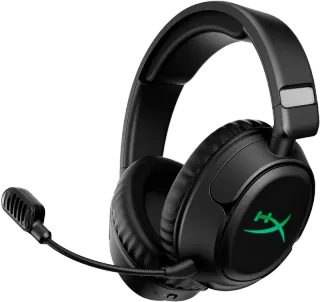
Two wireless gaming headsets, roughly the same price, both new for 2025, but they take different paths. The HyperX CloudX Flight 2 Wireless leans on endurance and a straightforward gaming sound, while the Razer Kraken Kitty V3 Pro adds multipoint and a distinctive look. Here is how they compare, using published reviews and recorded specifications only.
Price and positioning
Both headsets sit in the budget-to-mid range for wireless gaming gear. The HyperX CloudX Flight 2 Wireless is listed at $100, and the Razer Kraken Kitty V3 Pro at $105. That five-dollar gap is negligible, so price alone should not decide this.
The HyperX is a no-frills performer: 50 mm dynamic drivers, a stiff frame, and a focus on battery life. The Razer is lighter on driver size (40 mm dynamic) but heavier in the hand at 390 g versus 336 g, and it carries a more playful design with customizable RGB lighting. Neither offers active noise cancellation, and both use Bluetooth 5.3 with SBC and AAC codecs.
The scores, side by side
HearWiki's headline buyability scores are close. The HyperX scores 82/100, the Razer 82/100. That is effectively a tie—a 0.3-point gap is within normal review variance. Do not read it as a clear winner.
Sub-scores tell a similar story. Both get 8.0/10 for sound. The HyperX leads on battery (9.3/10 vs 8.7/10) and value (8.9/10 vs 8.8/10). The Razer leads on calls (8.7/10 vs 6.3/10) by a clear margin. ANC sub-scores are not listed for either, which is consistent with neither having active noise cancellation.
Sound
Both headsets are tuned for gaming, not audiophile listening. The HyperX's 50 mm drivers deliver punchy, detailed audio with strong positional cues, according to published reviews. The Razer's 40 mm drivers offer a solid experience but lean toward a gaming signature rather than neutral reproduction.
In practice, you will likely notice the HyperX's slightly fuller bass and clearer separation in busy scenes. The Razer is competent but not exceptional. If you play competitive shooters where footsteps matter, the HyperX has the edge; if you mostly play casually, the difference is minor.
Noise cancelling and battery
Neither headset has active noise cancellation. The HyperX explicitly lacks it, and the Razer does too. If you need to block out background noise, look elsewhere—passive isolation from the ear cups is all you get.
Battery life is where the HyperX dominates. It offers 150 hours per charge, a figure that is almost unheard of in wireless gaming headsets. The Razer manages 70 hours per charge, which is still long but less than half the HyperX. Neither lists a with-case figure, because these are over-ear headsets, not true wireless earbuds; the battery is in the headset itself.
For context, 150 hours means you can go weeks between charges with regular play. The Razer's 70 hours is still excellent—most competitors offer 30–50 hours—but if endurance is your priority, the HyperX wins outright.
Calls and everyday use
The Razer is clearly better for calls. Its sub-score of 8.7/10 reflects a detachable mic that performs well, while the HyperX's 6.3/10 suggests a mediocre built-in mic. The HyperX has two microphones versus the Razer's one, but quality matters more than count.
For everyday use, the Razer adds multipoint, so you can connect to two devices at once—say, a PC and a phone—and switch between them. The HyperX does not support multipoint. Neither has wireless charging, an IP rating, transparency mode, or wear detection; those features are not listed for either.
Comfort is a mixed bag. The HyperX's stiff frame and firm padding may reduce comfort during long sessions, according to reviews. The Razer's plastic build may feel less premium, according to reviews, and at 390 g it is the heavier of the two. Try both if you can, or weigh the trade-offs: the HyperX is heavier on endurance, the Razer on call quality and connectivity.
Which one should you buy?
Choose the HyperX CloudX Flight 2 Wireless if you want maximum battery life and a punchy gaming sound, and you do not mind a mediocre mic or a stiff fit. It is the better pick for long gaming sessions away from a charger.
Choose the Razer Kraken Kitty V3 Pro if you want better call quality, multipoint connectivity, and a distinctive look with customizable RGB. The shorter battery life is still long, and the sound is solid even if not class-leading.
If you are torn, the deciding factor is likely the mic. Gamers who chat frequently will prefer the Razer; solo players who value endurance will prefer the HyperX. For a full spec-by-spec breakdown, see the comparison table.
FAQ
Which headset has better battery life?
The HyperX CloudX Flight 2 Wireless offers 150 hours per charge, which is more than double the Razer Kraken Kitty V3 Pro's 70 hours. If battery life is your top priority, the HyperX is the clear choice.
Does either headset have active noise cancellation?
No. Neither the HyperX CloudX Flight 2 Wireless nor the Razer Kraken Kitty V3 Pro has active noise cancellation. You will rely on passive isolation from the ear cups.
Can I connect both headsets to two devices at once?
Only the Razer Kraken Kitty V3 Pro supports multipoint, allowing simultaneous connections to two devices. The HyperX CloudX Flight 2 Wireless does not list multipoint support.
For more gaming headset options, check our best gaming headsets page, or explore all headphones in the HearWiki database.