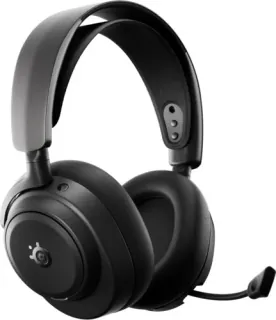
Two gaming headsets, two very different approaches. The Asus ROG Kithara is a wired planar magnetic headset that puts all its money into driver technology, while the SteelSeries Arctis Nova Pro Omni is a wireless model with active noise cancelling and a hot-swappable battery. Both cost a serious chunk of change, but they ask you to make very different trade-offs. This head-to-head works through the specs, the published review consensus, and the value case for each, so you can decide which one belongs on your desk.
Price and positioning
The Asus ROG Kithara is priced at $300, the SteelSeries Arctis Nova Pro Omni at $400. That $100 gap buys a lot of features on the SteelSeries side: wireless connectivity, hybrid ANC, transparency mode, and a 30-hour battery per charge. The ROG Kithara, by contrast, is a wired-only headset with no ANC and no battery at all, so its price is entirely about the driver and the sound it produces.
Positioning matters here. The Kithara is aimed at someone with a dedicated DAC or amp who wants a large planar driver and does not care about cables. The Arctis Nova Pro Omni is aimed at someone who wants one headset for gaming and everyday listening, with the freedom to move around the room. Neither is a budget option, and neither is trying to be the other.
The scores, side by side
The HearWiki buyability score for the Asus ROG Kithara is 83/100, and for the SteelSeries Arctis Nova Pro Omni it is 82/100. That is a one-point gap, which is effectively a tie. These are not scores that separate the two headsets in any meaningful way; they both land in the same "very good but not class-leading" band.
The sub-scores tell a clearer story. The Kithara leads on sound with 9.2/10 against 8.7/10, and on calls with 8.7/10 against 7.6/10. The Arctis Nova Pro Omni leads on battery with 9.5/10 (the Kithara has no battery figure listed). On value the Kithara is ahead again, 8.4/10 against 7.5/10. The Arctis Nova Pro Omni's ANC sub-score is 7.2/10; the Kithara's ANC sub-score is not listed because it has no ANC.
So the picture is: the Kithara wins on sound, calls, and value; the Arctis Nova Pro Omni wins on battery and offers ANC, which the Kithara cannot. The headline scores are close enough that you should not pick one over the other based on the number alone.
Sound
The Asus ROG Kithara uses a 100 mm planar magnetic driver, which is unusually large for a headset. Its published frequency response runs from 8 Hz to 55 kHz, and it has a very low 16-ohm impedance, so most devices can drive it without extra amplification. The SteelSeries Arctis Nova Pro Omni uses a 40 mm dynamic driver with a 38-ohm impedance. On paper, the planar driver has the advantage in detail retrieval and low distortion, and the sub-scores reflect that: 9.2/10 for the Kithara against 8.7/10 for the Arctis Nova Pro Omni.
That 0.5-point gap is real but not enormous. Published reviews of the Kithara consistently praise its clarity and separation, especially in games with complex soundscapes like shooters and RPGs. The Arctis Nova Pro Omni is no slouch, but its dynamic driver cannot match the planar's speed and resolution. If you are a competitive gamer who relies on footsteps and directional cues, the Kithara is the safer bet. If you play casually and want a headset that also sounds good for music, the Arctis Nova Pro Omni will do fine, just with a bit less top-end detail.
Noise cancelling and battery
The SteelSeries Arctis Nova Pro Omni has hybrid active noise cancelling, with a transparency mode for when you need to hear the room. Its ANC sub-score is 7.2/10, which is decent but not top-tier. The Asus ROG Kithara has no ANC at all, and no transparency mode, so if you play in a noisy environment, the SteelSeries is the only option here. The Kithara's ANC sub-score is not listed.
Battery is where the Arctis Nova Pro Omni runs away with it. It offers 30 hours per charge, or 19 hours with ANC enabled. The Kithara is wired, so it has no battery and no battery figure listed. The Arctis Nova Pro Omni also supports hot-swappable batteries, which means you can keep playing while a spare charges. The Kithara does not need a battery, but it also does not give you the freedom to move away from your desk.
Neither headset has an IP rating, so do not expect water resistance from either. The Arctis Nova Pro Omni supports multipoint Bluetooth 5.3, so you can connect to two devices at once; the Kithara is wired and does not have Bluetooth, so multipoint is not applicable.
Calls and everyday use
The Kithara scores 8.7/10 for calls, the Arctis Nova Pro Omni 7.6/10. Both use a single MEMS microphone. The Arctis Nova Pro Omni adds AI-based call noise reduction, while the Kithara does not list any call noise reduction, so the Kithara's higher calls score comes down to the clarity of the mic itself rather than any background-noise processing.
For everyday use, the Arctis Nova Pro Omni is more versatile. It connects via Bluetooth 5.3 with SBC and LC3 codecs, so you can use it with a phone or tablet, and the transparency mode lets you hear announcements or conversations without taking it off. The Kithara is strictly a desk headset: plug in, play, unplug.
Neither headset lists wear detection or wireless charging. The Kithara has no onboard controls for volume or mute, which is a real annoyance if you want to adjust things mid-game. The Arctis Nova Pro Omni has onboard controls, so you can manage calls and volume without reaching for your device.
Which one should you buy?
If you are a competitive or audiophile-leaning gamer who plays at a desk with a wired setup, buy the Asus ROG Kithara. It costs less, sounds better, scores higher for calls, and its low impedance means you do not need a fancy amp. The lack of ANC and wireless is fine if you never leave your chair.
If you want one headset for gaming, music, and calls across multiple devices, buy the SteelSeries Arctis Nova Pro Omni. The $100 premium buys you wireless freedom, ANC, transparency, and a hot-swappable battery that keeps you playing for hours. You give up some sound quality and a few points on the calls score, but you gain a headset that works everywhere.
For a full side-by-side of every spec, see the comparison table.
FAQ
Is the Asus ROG Kithara worth it over the SteelSeries Arctis Nova Pro Omni?
If you only care about sound quality and already have a wired setup, yes. The Kithara costs $100 less, scores higher for sound, and its planar driver is more detailed. But you lose wireless, ANC, and battery life, so it only makes sense if you never need those features.
Can the SteelSeries Arctis Nova Pro Omni be used with a phone?
Yes, it has Bluetooth 5.3 with SBC and LC3 codecs, so you can pair it with a phone for music and calls. It also supports multipoint, meaning you can connect to a PC and a phone at the same time and switch between them.
Does the Asus ROG Kithara have a microphone?
Yes, it has a single MEMS microphone, and it scores 8.7/10 for call quality. However, it has no onboard controls for mute or volume, so you will need to use software or your device's controls to adjust the mic.