Choosing a gaming headset is mostly about knowing which compromises you can live with. The market is full of similar-looking over-ears with RGB and "surround sound" stickers, but the differences that matter are microphone quality, connection type, comfort, and how the drivers are tuned. This guide walks through each of those in turn, then points you to the highest-scoring models in our database.
If you want the short version, start with our best gaming headsets page. For the full list of everything we've tested, head to the gaming category.
Start with the microphone
The microphone is the most underrated component of a gaming headset. You can forgive average sound, but a teammate who can't hear you clearly is a problem. Most headsets use one of two designs: a boom mic that extends from the ear cup, or integrated mics built into the housing.
Boom mics are almost always better. They sit closer to your mouth, pick up less background noise, and usually have a cardioid pattern that rejects sound from the sides. Integrated mics are fine for casual calls, but they tend to sound distant and pick up keyboard clatter and room noise.
Sidetone, also called mic monitoring, is a feature worth checking for. It plays your own voice back into the ear cups so you don't shout. Not all headsets have it, and it's often buried in software. If you play with friends regularly, sidetone is a quality-of-life feature you'll notice every session.
Some headsets also offer a flip-to-mute boom, which is more reliable than a mute button you have to find mid-firefight. The HyperX Cloud Stinger 3 uses this design and costs $50, which makes it a sensible budget pick.
Wireless, wired, or both
Wireless headsets use one of two main connections: a 2.4GHz dongle or Bluetooth. The dongle is the one you want for gaming. It has lower latency, typically under 20ms, and a more stable connection. Bluetooth adds 30-100ms of latency depending on the codec, which is enough to throw off your aim in competitive shooters. Bluetooth alone is a poor fit for competitive play.
That said, Bluetooth is convenient. It lets you take calls, listen to music on your phone, and connect to a Nintendo Switch without a dongle. Some headsets, like the HyperX Cloud Alpha 2 Wireless, support both 2.4GHz and Bluetooth simultaneously. That costs more, but it's the most flexible setup.
Wired headsets are the cheap and reliable option. A 3.5mm jack works on PC, PlayStation, Xbox, and Switch with no pairing, no charging, and no latency. The HyperX Cloud III is a wired model that scores 76/100 and costs $100. It won't give you the freedom of wireless, but it will never die mid-match.
Battery life matters more than you might think. The HyperX Cloud III Wireless claims 120 hours, which is enough for weeks of play. The Turtle Beach Stealth Pro II manages 40 hours, and the SteelSeries Arctis Nova Pro Omni around 50. If you forget to charge, a wired fallback is a lifesaver.
Comfort is a spec
Comfort is not a luxury; it's a spec. A headset that hurts after an hour is useless, no matter how good it sounds. The two things to check are clamp force and earpad material.
Clamp force is how hard the headband presses your ears. Too much and you'll feel it around your temples. Too little and the headset slides around. You can't easily measure this before buying, so read reviews and look for mentions of glasses. If you wear glasses, look for deep earpads with soft foam, like the memory foam on the HyperX Cloud II Wireless.
Earpad material matters too. Leather or leatherette seals well but traps heat. Fabric or mesh breathes better but lets more sound in and out. Some headsets, like the HyperX Cloud Alpha Air, use open-back earcups for a wider soundstage, but they leak sound and offer almost no isolation.
Replaceable earpads are a plus. They wear out after a year or two, and being able to swap them for $20 is better than buying a new headset. Check whether the manufacturer sells spares before you commit.
Surround sound, honestly
Virtual surround sound is a marketing feature more than a technical one. Most games already render positional audio in stereo, and a good pair of stereo headphones will give you accurate left-right and front-back cues. A surround toggle usually just applies an EQ curve and some reverb, which can muddy the sound.
What matters more is the driver quality and tuning. A headset with clean, well-separated drivers will let you hear footsteps and gunfire directionally. The HyperX Cloud Alpha 2 Wireless uses dual-chamber 53mm drivers and scores 8/10 for sound. The HyperX Cloud III Wireless uses angled drivers for a similar effect.
If you want virtual surround, most headsets come with software that does it. DTS Headphone:X and Windows Sonic are the common ones. They're fine to try, but don't pay extra for them. A good stereo image will serve you better in most games.
The shortlist
These are the top four gaming headsets in our database by score, all at 78/100. They're different enough that your choice should come down to budget and platform.
HyperX Cloud III Wireless
The HyperX Cloud III Wireless costs $150 and is the best all-rounder. It has 120 hours of battery life, which is exceptional, and a comfortable build with durable materials. The angled drivers deliver clear spatial audio via DTS. It has ANC, which is rare in gaming headsets. The downsides are no Bluetooth for mobile use, and the design is bulky. Sound scores 7.5/10, battery 9/10.
HyperX Cloud Alpha 2 Wireless
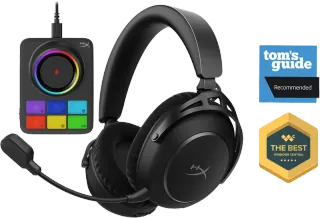
The HyperX Cloud Alpha 2 Wireless is the premium option at $300. It claims 250 hours of battery life, which is the best in the database, and has simultaneous 2.4GHz and Bluetooth 5.2. The 53mm dual-chamber drivers score 8/10 for sound. It includes a reprogrammable RGB base station for charging. The price is high, and you'll need the NGENUITY software for full features.
SteelSeries Arctis Nova Pro Omni
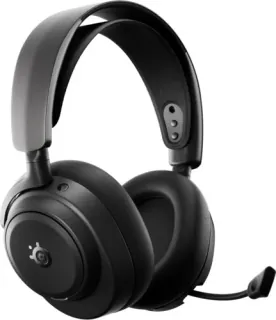
The SteelSeries Arctis Nova Pro Omni costs $115 and is a strong value pick. It has ANC, Bluetooth 5.3, and 50 hours of battery. Sound scores 8/10, ANC 7.5/10. It's a newer model, so our data on calls and value is less complete, but the core specs are solid for the price.
Turtle Beach Stealth Pro II
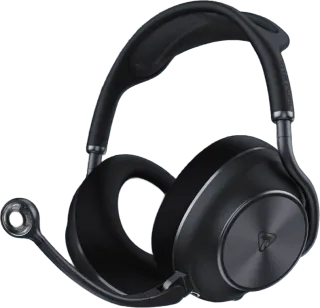
The Turtle Beach Stealth Pro II is the most expensive at $350. It has 60mm drivers, the largest in this list, and scores 8/10 for sound. ANC is 7.5/10, battery 8.5/10. It's a premium option for players who want big, immersive audio and don't mind the cost.
If you're on a tighter budget, the HyperX Cloud III at $100 is a wired alternative that scores 76/100, and the HyperX Cloud Stinger 3 at $50 is a solid entry point.
The alternative: headphones plus a mic
A good pair of general-purpose headphones plus a standalone microphone often beats a mid-range headset on sound. For the same money as a $200 gaming headset, you can get a pair of wired open-back headphones with better imaging and a USB condenser mic that sounds clearer than any boom.
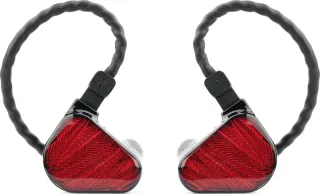
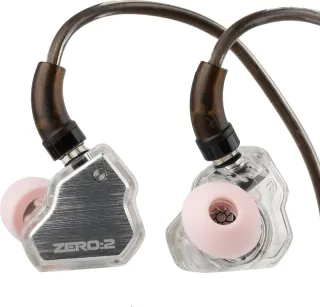
The trade-offs are real. You'll have two devices to manage, no integrated controls, and no chat-game audio mixing. But if sound quality is your priority and you play at a desk, this setup is worth considering. Our wired IEMs and over-ear pages are good starting points, though they're not gaming-specific.
For most people, though, a dedicated gaming headset is simpler and good enough. The models above all score above 70/100, which means they're competent at both gaming and music.
FAQ
What is the best gaming headset under $100?
The HyperX Cloud III at $100 is the best wired option under that price, scoring 76/100. It has comfortable memory foam, angled 53mm drivers, and a clear boom mic. If you want wireless, the HyperX Cloud II Wireless at $90 is a solid choice, though it lacks Bluetooth and is limited to PC and PlayStation.
Is Bluetooth good for gaming headsets?
Bluetooth is fine for casual games and mobile play, but not for competitive shooters. Latency is typically 30-100ms, which you'll notice in fast-paced games. A 2.4GHz dongle has much lower latency and a more stable connection. If you want both, look for a headset that supports simultaneous 2.4GHz and Bluetooth, like the HyperX Cloud Alpha 2 Wireless.
Do I need a boom mic on a gaming headset?
Yes, if you play multiplayer games. Boom mics sit closer to your mouth and reject background noise better than integrated mics. They also usually have a mute switch or flip-to-mute function. Integrated mics are fine for occasional calls, but for regular team play, a boom mic is the difference between being heard and being ignored.